Using FTDI FT232RL as a JTAG adapter via openOCD
or how to zombify a ftdi serial-to-usb chip

One of the cool tools in embedded is openOCD. Basically, it enables us to
interface between host (PC) and target (MCU) for flashing and debugging. It does
so by utilizing the electrical signalling of an interface device to bit-bang
a protocol.
FTDI FT232RL is a chip for converting UART signals to USB and vice-versa. It is
often used in applications where the serial port is not available on host (like
modern PCs) but we want to manipulate a UART device.
In this post, we are going to utilize FTDI FT232RL as a JTAG debugger/programmer
via openOCD, meaning something it was not originally designed for.
- Set up openOCD on your system.
I’m using Liviu Ionescu’s binaries here since my distro’s binaries are a little older. - Follow the documentation of openOCD for your interface and target.
The pdf is located underyour_dir/liviu-openocd-0.10.0-15/share/doc/pdf. Instructions are found in chapter 8 underft232r - Attach the wires from interface to target.
Here our target is the Bluepill board (STM32F103). Your FTDI board may have come soldered only for Vcc/GND/Tx/Rx pins but we also need other pins here. So first solder a header to all break out pins.
Caution: STM32F103 is a 3v3 MCU. Remember to change your FT232R VCC jumper to 3v3 volts otherwise you will damage your chip!
Schematic Description
FT232RL : Jumper on 3V3
Bluepill : Both jumpers on 0
| |
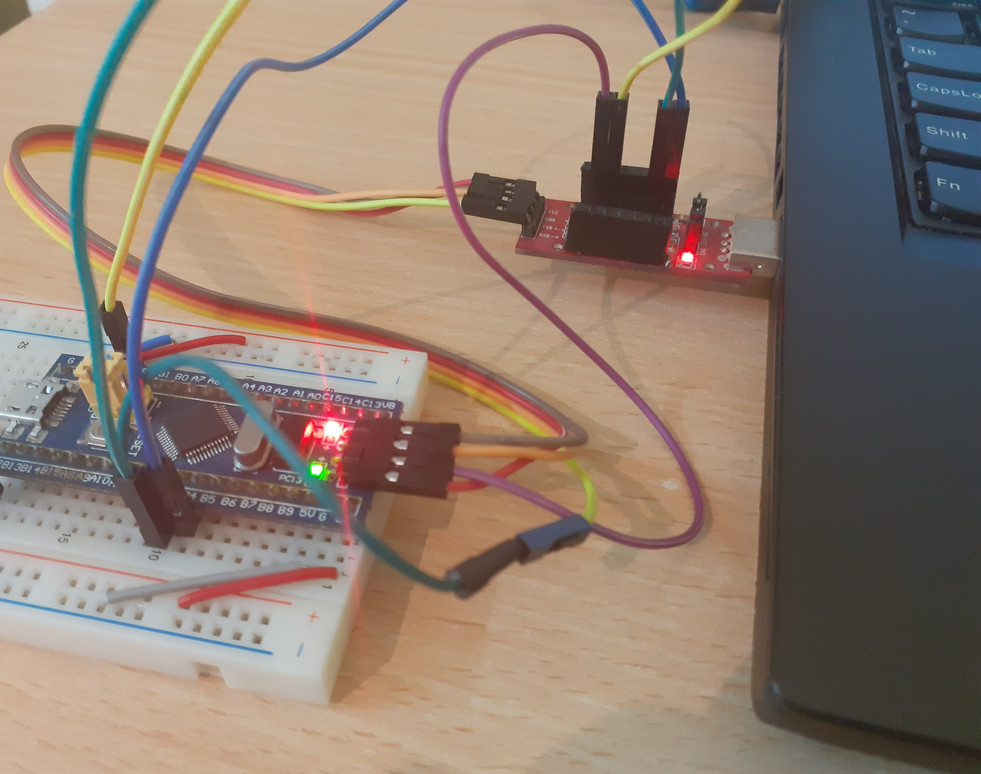
Flashing with JTAG with FT232R using OpenOCD
- Open two terminals. On one of them execute
openocd -f interface/ft232r.cfg -f board/stm32f103c8_blue_pill.cfg. On the other executetelnet localhost 4444.
Now you have a JTAG adapter! You can run these commands on the latter terminal or use GDB according to your workflow (see openOCD documentation for explanation):
list memory banks of target
flash banksflash listflash probe 0reading firmware from flash to disk
flash read_bank 0 /tmp/saved.imgerasing flash
reset initflash erase_sector 0 0 lastwriting firmware to flash from disk
flash write_bank 0 /tmp/saved.imgresetverifying if upload was successful
flash verify_bank 0 /tmp/saved.img
Instead of using two terminals, we can use openOCD’s program script to
flash&verify the MCU in one go which is suitable for substituting with st-link
st-flash utility in makefiles. Exit other instances before trying this:
| |
Flashing and debugging is slow with FT232R (FT232H would be much faster). For example reading the complete 128 KiB of bluepill’s flash takes ~50 seconds…but hey, our zombie FTDI is dancing to the tunes imposed by openOCD and it sings JTAG slowly but correctly!